Acer Predator RGB & Turbo Control for Linux
Open-source Linux kernel driver + native GUI bringing 4-zone RGB keyboard control and hardware turbo mode to Acer Predator/Helios/Nitro gaming laptops.
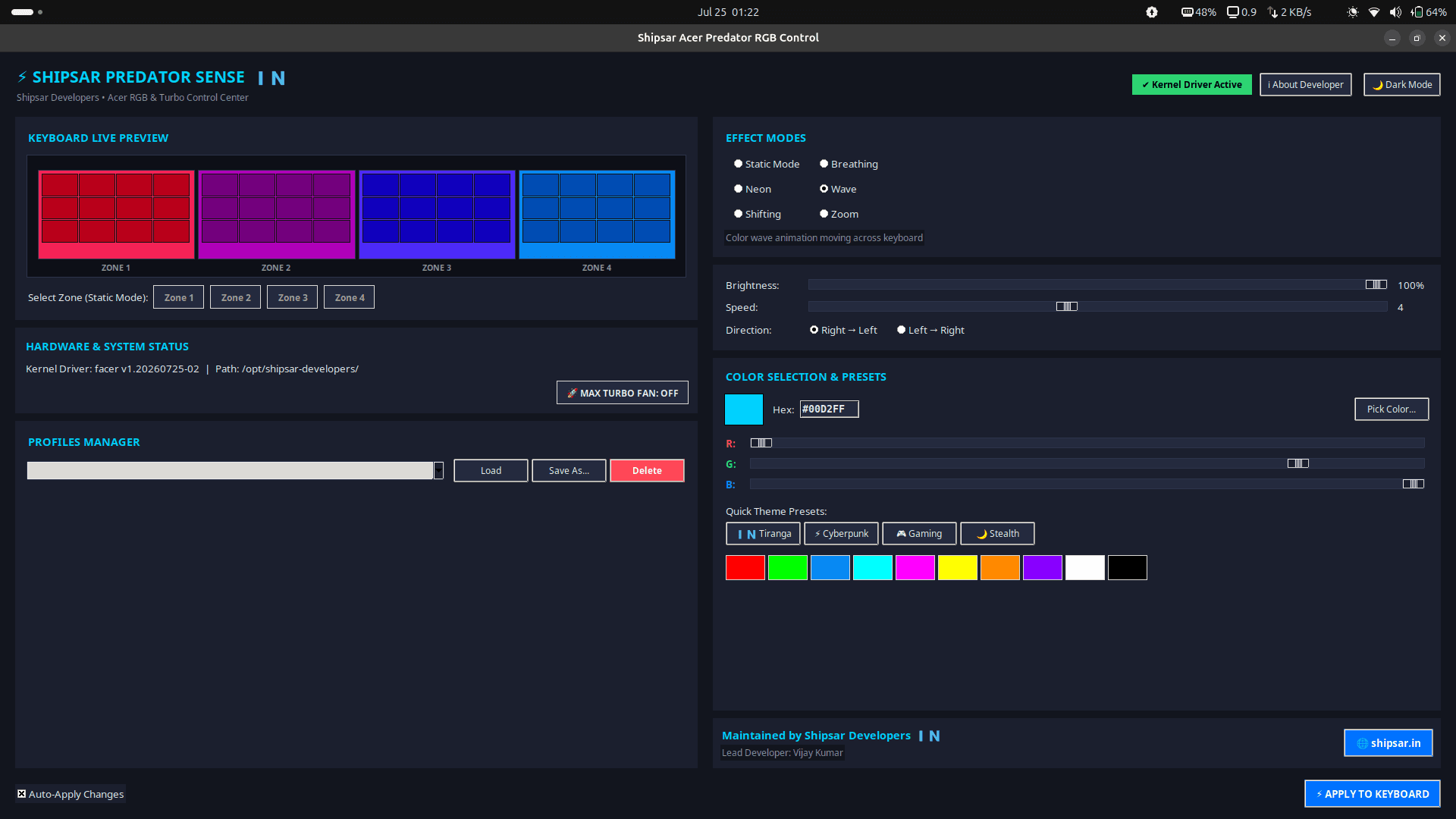
Acer's official PredatorSense control app has never shipped for Linux, leaving Predator, Helios, and Nitro gaming laptop owners with non-functional RGB keyboards and hardware turbo buttons the moment they leave Windows.
The Challenge
The keyboard and turbo controls on these laptops are exposed through ACPI-WMI rather than a standard USB HID interface, meaning there's no generic driver that can talk to the hardware — this requires real kernel module development, not a userspace workaround. Community driver scripts in this space have a common failure mode: they break on the next kernel upgrade because they aren't packaged to recompile automatically.
Our Approach
We built and open-sourced a full solution under GPL-2.0: a native Linux kernel driver paired with a Python Tkinter desktop GUI — a project that goes well beyond typical web development or mobile app development work into genuine systems-level software engineering. The driver is packaged with DKMS so it automatically recompiles across kernel upgrades instead of breaking on the next apt upgrade.
The Solution We Built
- Native kernel module talking directly to the ACPI-WMI interface, with DKMS packaging for automatic recompilation across kernel upgrades
- 4-zone RGB control (Static, Breathing, Neon, Wave, Shifting, Zoom) and hardware turbo-fan mode through a dependency-light native GUI
- Scriptable CLI for power users who want to bind lighting changes to hotkeys
- Multi-distro packaging — pre-built .deb, AUR, and universal .run packages covering every major Linux distribution
- systemd service persisting settings across reboots, with self-diagnosing error dialogs that email a full system report straight to the developer
The Outcome
For businesses evaluating a custom software development company for anything beyond standard web or mobile work — hardware integrations, Linux/embedded systems, driver-level development, or open-source tooling — this project is direct proof of engineering capability at the systems level, not just the application layer. It's the kind of build that demonstrates a team can go as deep as the problem actually requires, kernel module and all.
On This Page
Quick Actions
Built With
Key Features
- Hardware Turbo Mode with auto-persistence across reboots
- 4-Zone RGB Backlight Control (Static, Breathing, Neon, Wave, Shifting, Zoom)
- Auto Kernel Persistence via DKMS across kernel upgrades
- Native Python Tkinter dark-mode desktop GUI
- Scriptable CLI for hotkeys and automation
- Multi-distro packaging: .deb, AUR/Arch, universal .run bundle
- Self-diagnosing error dialogs with one-click developer bug reports
More of our top projects

ShunyaScape

AI Legal Compliance Platform