Predator Sense for Linux: Acer RGB & Turbo Control
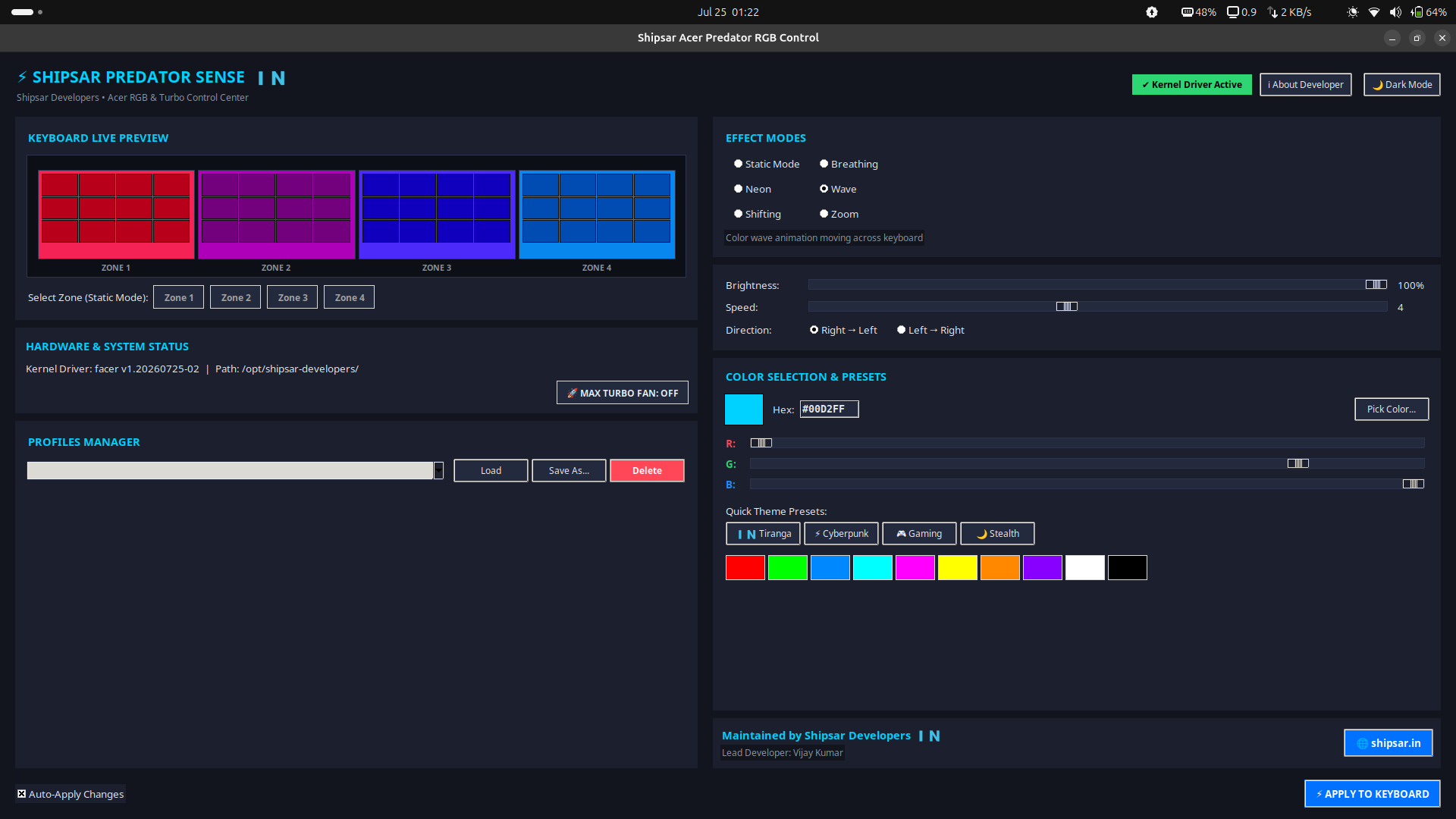
Bringing Predator Sense to Linux: An Open-Source RGB & Turbo Controller for Acer Gaming Laptops
Acer's official "PredatorSense" control panel has never shipped for Linux. If you dual-boot or run Linux full-time on a Predator, Helios, or Nitro machine, the 4-zone RGB keyboard and the hardware turbo-fan button have historically just... not worked. We built Shipsar Acer Predator RGB & Turbo Control to close that gap: a native Linux kernel driver paired with a proper desktop GUI, released as open source under GPL-2.0.
- Repository: github.com/Be1newinner/acer-gaming-laptop-rgb-lights-gui
- License: GPL-2.0
- Stack: C (kernel module), Python/Tkinter (GUI), Shell + Makefile (packaging)
Why This Needed a Kernel Module, Not Just a Script
Acer's RGB keyboard and turbo button are exposed through ACPI-WMI, not a standard USB HID interface, so there's no generic userspace driver that can talk to them. The project builds on top of Jafar Akhondali's original reverse-engineered kernel module, packaging it with DKMS so it automatically recompiles itself across kernel upgrades — the single biggest reason community keyboard-lighting scripts tend to stop working after a routine apt upgrade.
Two ACPI-WMI GUIDs have to be present in the laptop's firmware for the character devices (/dev/acer-gkbbl-0, /dev/acer-gkbbl-static-0) to even show up:
61EF69EA-865C-4BC3-A502-A0DEBA0CB531   # WMID interface v2
7A4DDFE7-5B5D-40B4-8595-4408E0CC7F56   # Gaming keyboard backlight
If both are exposed, the module has a real target to write to; if not, no amount of userspace tooling can fix it — a hard firmware limitation rather than a driver bug.
What the GUI Actually Controls
On top of the driver sits a native Tkinter dark-mode app (deliberately dependency-light — no Electron, no browser runtime) that drives:
- Hardware Turbo Mode — toggles the physical fan-boost button and persists the setting across reboots via a systemd service.
- 4-zone RGB backlighting — Static, Breathing, Neon, Wave, Shifting, and Zoom effects, each zone addressable independently.
- A CLI mode for anyone who'd rather script lighting changes or bind them to hotkeys than click through a GUI.
# Cyan static color on zone 1
python3 facer_rgb.py -m 0 -z 1 -cR 0 -cG 210 -cB 255

# Wave effect, speed 5, full brightness
python3 facer_rgb.py -m 3 -s 5 -b 100
A shipsar-acer-rgb.service systemd unit restores whatever Turbo/lighting state you last set, every boot — no need to relaunch the GUI just to get your lighting back.
Packaging for Every Major Distro
A big part of the effort went into distribution, not just the driver:
.debfor Ubuntu/Debian/Mint/Pop!_OS, installing to/opt/shipsar-developers/acer-rgb-controller/and pulling inlinux-headers-genericautomatically so DKMS has what it needs to build.- AUR/Arch package for Arch, Manjaro, EndeavourOS.
- A single-file
.runbundle that works on any distro without touching a package manager at all —./dist/AcerPredatorRGB.run --install.
./build_all.sh builds all three from one command, so a contributor doesn't need to know Arch packaging conventions to test a Debian build, or vice versa.
Designed to Debug Itself
Anyone who's supported open-source hardware drivers knows the failure modes repeat: the systemd service never started, Secure Boot's Machine Owner Key was never enrolled so the signed kernel module isn't trusted, or the matching linux-headers package is missing on an HWE kernel. Rather than making users guess, the GUI's error dialogs ship with a Copy to Clipboard and a Send to Developer button that attach a full diagnostic — OS, kernel version, desktop session, device status, and the exact error — directly into an email to info@shipsar.in. It turns "my keyboard lighting doesn't work" bug reports into something actually actionable on the first message.
Try It
make package-deb
sudo apt install ./dist/shipsar-acer-rgb-controller_*.deb
rgb-controller
Full install instructions for Arch and the universal .run bundle are in the README. Issues, hardware compatibility reports, and pull requests are welcome — this is exactly the kind of driver where more laptop models in the wild means more coverage for everyone.